

Hi all,
My wife saw an indicator of some sort pop up on the cockpit above the speedometer while driving our 2020 x4 today. I have checked the manual and Google searches to no avail and am hoping someone here can help.
She described it as a vehicle silhouette (a small version of the car that shows at startup) with the check control symbol on top of it in orange (triangle with exclamation point inside). It went away after “a little while” but showed twice on the same drive.
No check control messages showing under vehicle status. No apparent issues that I can find. It doesn’t match any of the lights in the manual or that flash when you first turn the car on.
The location of this light is the same spot where the indicator for adaptive cruise control (the auto follow option) shows up.
The car is three months old and the dealer will check it out for us, but wondering if it’s just a light she’s not familiar with from one of the new features or something else I’m just not thinking of.
Thanks!
5.5KVIEWS
14REPLIES
2APPRECIATES
8ACTIVE PEOPLE
03-20-2021LAST POST
03-18-2021
03-18-2021

Collision warning system? Maybe she was too close to the car in front of her. Sounds like that icon.

nyalpine90
03-18-2021

XxDanoxX
Second Lieutenant

131
REP
280
POSTS
lifeshonanstyle wroteHad the exact same pop up in my HUD at the weekend - didn't happen again, it was pretty quick as well and I think it had a speed warning next to it.Hi all,
My wife saw an indicator of some sort pop up on the cockpit above the speedometer while driving our 2020 x4 today. I have checked the manual and Google searches to no avail and am hoping someone here can help.
She described it as a vehicle silhouette (a small version of the car that shows at startup) with the check control symbol on top of it in orange (triangle with exclamation point inside). It went away after “a little while” but showed twice on the same drive.
No check control messages showing under vehicle status. No apparent issues that I can find. It doesn’t match any of the lights in the manual or that flash when you first turn the car on.
The location of this light is the same spot where the indicator for adaptive cruise control (the auto follow option) shows up.
The car is three months old and the dealer will check it out for us, but wondering if it’s just a light she’s not familiar with from one of the new features or something else I’m just not thinking of.
Thanks!
I remember (safely) breaking the speed limit to see if it would appear again, but it didn't.
03-18-2021

rob175
Major

1,006
REP
1.4K
POSTS
Yep...I agree, it's the collision warning symbol. I've had it appear a couple of times myself. Yet in my case I didn't think I was about to crash, or following too close to the car in front, or my closing distance was too fast. It just lite up then went off, with no application of the brakes but I think did I touch the brakes ever so lightly never the less.
I'm not sure what it does or why it lights. I don't think it would automatically brake my car if I didn't tap my brakes, but I certainly don't want to test it.
(btw, my 2020 X3 doesn't have all the warning options like blind spot, or active cruise control, or lane departure....its pretty "stock".
Maybe others know more how the entire system works.
I'm not sure what it does or why it lights. I don't think it would automatically brake my car if I didn't tap my brakes, but I certainly don't want to test it.
(btw, my 2020 X3 doesn't have all the warning options like blind spot, or active cruise control, or lane departure....its pretty "stock".
Maybe others know more how the entire system works.
03-18-2021

From my experience, there are 3 stages of the collision warning symbol (a red silhouette of a car viewed from behind).
Oh, there is also a similar collision warning symbol that is the same red, but the silhouette is of a car viewed from it's side. This will come up if it detects a car coming in from left or right while you are moving ahead and it thinks you may collide with it.
I think that is it and yes I've experienced all of these. I do notice that these may come up if you are driving on a road with tight turns at a certain rate of speed and there are vehicles parked on the side. Sometimes it thinks you may collide with the parked vehicles.
Lastly, the other collision warning symbol is the pedestrian warning system that is a red silhouette of a walking person. I thought I'd just mention that anyway but I suspect everyone knew that. I think I've only seen this one ever in my car.
- It will come up if the car thinks I am too close to the car ahead of me.
- If the system thinks I am in danger of a collision based on speed and proximity (and I am sure it's measuring the proximity delta), then the symbol will blink and it will beep quickly 3 times.
- If the system believes you are imminently going to collide with the vehicle in front of you, it will do the same as the last stage plus start applying the brake.
Oh, there is also a similar collision warning symbol that is the same red, but the silhouette is of a car viewed from it's side. This will come up if it detects a car coming in from left or right while you are moving ahead and it thinks you may collide with it.
I think that is it and yes I've experienced all of these.
I do notice that these may come up if you are driving on a road with tight turns at a certain rate of speed and there are vehicles parked on the side. Sometimes it thinks you may collide with the parked vehicles.Lastly, the other collision warning symbol is the pedestrian warning system that is a red silhouette of a walking person. I thought I'd just mention that anyway but I suspect everyone knew that. I think I've only seen this one ever in my car.
03-18-2021

titomi
Colonel

946
REP
2K
POSTS
All of these plus the triangle as mentioned at the bottom of the attached picture. This is from the manual. Highly recommend to 
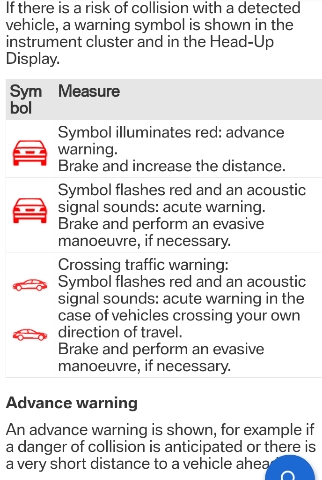
03-19-2021

Thanks for the replies. I also assumed collision warning, but I’m fairly certain that lights up in the center of the cockpit (and on HUD) and is accompanied with lights. I’ve seen it plenty of times, and is an orange/red car per the image titomi posted.
My wife says location was to the left, above the speedometer, no sound, on a highway straightaway.
The manual also doesn’t have a car icon with a triangle on top of it listed anywhere that I could find.
It’s at the dealer now, maybe they can figure it out.
Thanks!
My wife says location was to the left, above the speedometer, no sound, on a highway straightaway.
The manual also doesn’t have a car icon with a triangle on top of it listed anywhere that I could find.
It’s at the dealer now, maybe they can figure it out.
Thanks!
03-19-2021
lifeshonanstyle wroteIn my 2021 X3 with the active cockpit display, the collision warning icons light up in the left speedometer, right above the digital readout - where the you would normally see your lane keeping assistant and cruise control distance (which disappears in lieu of the warning). It also shows in the HUD too. It doesn't show in the center.Thanks for the replies. I also assumed collision warning, but I’m fairly certain that lights up in the center of the cockpit (and on HUD) and is accompanied with lights. I’ve seen it plenty of times, and is an orange/red car per the image titomi posted.
My wife says location was to the left, above the speedometer, no sound, on a highway straightaway.
The manual also doesn’t have a car icon with a triangle on top of it listed anywhere that I could find.
It’s at the dealer now, maybe they can figure it out.
Thanks!
In my 2018 X3 with the previous digital instrument cluster, it does show in the center.
03-19-2021
rob175
Major
1,006
REP
1.4K
POSTS
Thanks for the explanation, I missed that when I read the manual.
After reading that again, it DOESN'T say the car will apply the brakes. Rather, from my reading the description, I think the manual is telling the driver to "brake" and possibly "perform an evasive maneuver if necessary".
So, from my reading, it's ONLY a warning nothing more. It warns the driver to do something, but it's still up to the driver to act. No automatic braking by the car.
After reading that again, it DOESN'T say the car will apply the brakes. Rather, from my reading the description, I think the manual is telling the driver to "brake" and possibly "perform an evasive maneuver if necessary".
So, from my reading, it's ONLY a warning nothing more. It warns the driver to do something, but it's still up to the driver to act. No automatic braking by the car.

dreamerM40i
03-19-2021
titomi
Colonel
946
REP
2K
POSTS
lifeshonanstyle picture is from MY18, so might be different in your car.It WILL eventually engage the brakes. That's part of the emergency braking and it's not so well documented in the manual.
03-19-2021

eX3Werks
Private First Class

92
REP
141
POSTS
Mine engages the brakes. I have the 18 one. Not sure if this is a standard feature or only comes with options.
03-19-2021
rob175
Major
1,006
REP
1.4K
POSTS
Well.....anyone want to try it out? Just find a parking lot and speed towards a parked car, don't touch your brakes, and report back how that works out for you......
In my case, the warning symbol has come on 3 times in the past year and zero brake was engaged.
Now I wonder about the "pedestrian" warning....will it brake or just light up?......anyone want to stand in front of my car?
In my case, the warning symbol has come on 3 times in the past year and zero brake was engaged.
Now I wonder about the "pedestrian" warning....will it brake or just light up?......anyone want to stand in front of my car?
03-20-2021

rob175 wroteBoth. It will do the same thing as the car warning. A warning first and then if it thinks there is an impending collision then it will brake. I've had the pedestrian warning come on beforeWell.....anyone want to try it out? Just find a parking lot and speed towards a parked car, don't touch your brakes, and report back how that works out for you......
In my case, the warning symbol has come on 3 times in the past year and zero brake was engaged.
Now I wonder about the "pedestrian" warning....will it brake or just light up?......anyone want to stand in front of my car?
03-20-2021
rob175
Major
1,006
REP
1.4K
POSTS
I found this video on YouTube....a very BRAVE tester!!!! (note the disclaimer "don't try this yourself")
I learned there are TWO VERSIONS depending on your car's packages....good to know because mine doesn't have any packages other than the Convenience Pkg. Based on that my car has just the "city version".
I learned there are TWO VERSIONS depending on your car's packages....good to know because mine doesn't have any packages other than the Convenience Pkg. Based on that my car has just the "city version".
03-20-2021
rob175 wroteI had mentioned earlier that I've experienced all of these situations. I assure you that the brake intervention comes in if the car feels you are really on a course to collide with the car in front of your based on your speed, whether you are accelerating or decelerating, and the change in distance between you and the car in front of you. I've had this since my 2015 X3 and I posted a video about it in action years back.Well.....anyone want to try it out? Just find a parking lot and speed towards a parked car, don't touch your brakes, and report back how that works out for you......
If you watch this (excuse the music - lol) - the loud sound that sounds like rubber rubbing is the brake intervention starting to brake before I actually start manually braking. You can feel this because as you put your foot to the brake pedal, you already can tell the pedal has started to push down before you get there.
Now, the only question is I don't know if it will stop the car completely because at I am pressing the brake at that point to stop the car and when I let go, the brakes release. For pedestrians it will - just not sure about for cars.
